
Sending money to Mum from Riyadh
Month end, salary in. Send it to your mother's bKash as easily as you did from home.
Put one address in your phone's settings, once. Your Bangladeshi apps open like they did back home. No extra app to keep running, no slower internet.
 bKash
bKash Nagad
Nagad Rocket
 Upay
Upay Alaap
Alaap DIAL
DIAL Brilliant
 Ad blocker
You live far from home. The things you do for home shouldn't have to stop.
Month end, salary in. Send it to your mother's bKash as easily as you did from home.
After a long shift, call the family on Alaap and hear everyone clearly.
The electricity bill at home, your brother's school fee: pay them with Nagad from where you are.
Wherever you are, if your phone has internet, it works.
From sending money to calling home, they work the way they do in Bangladesh.
Send money, pay and cash out from abroad.
Your Nagad account, wherever you are.
Dutch-Bangla Bank's Rocket app.
Upay payments and transfers.
Call Bangladeshi numbers with Alaap.
Link3 DIAL calling app.
Brilliant calling app.
Blocks ads and trackers in apps and browsers.
Nothing to install. It takes about two minutes.
Create an account and pay with the mobile banking app you already use.
Copy your own address into Private DNS. On iPhone, install a small profile instead.
That's all. Your Bangladeshi apps work as if you were home.
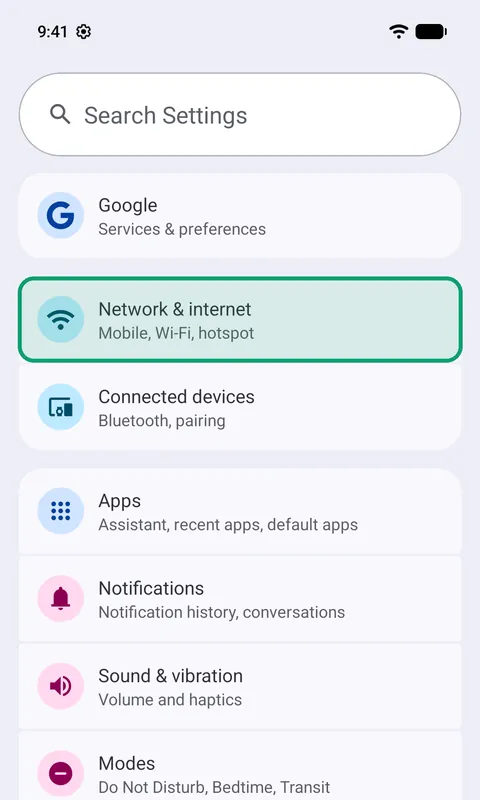
1Open Settings, then Network & internet
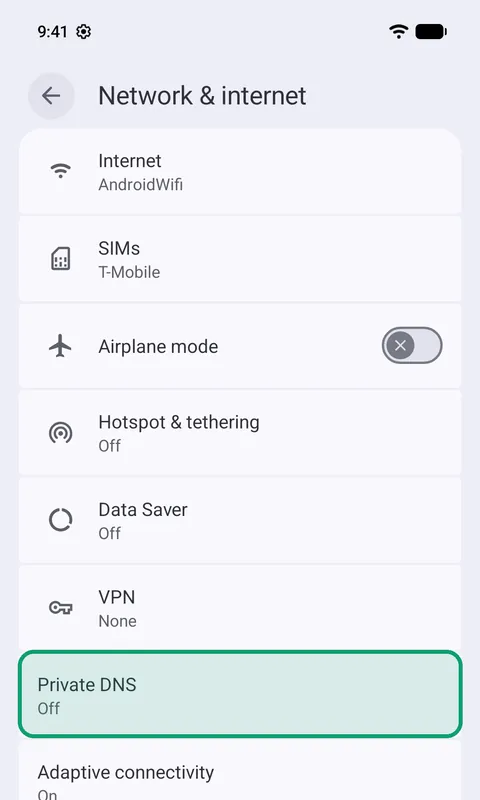
2Tap Private DNS
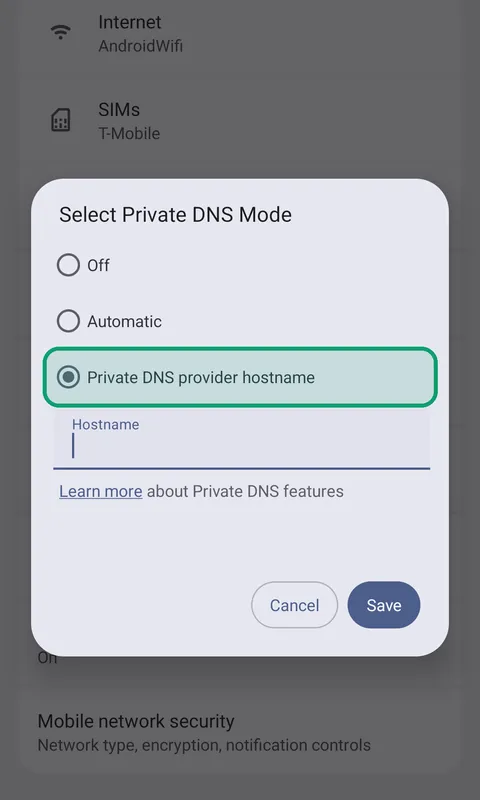
3Choose Private DNS provider hostname
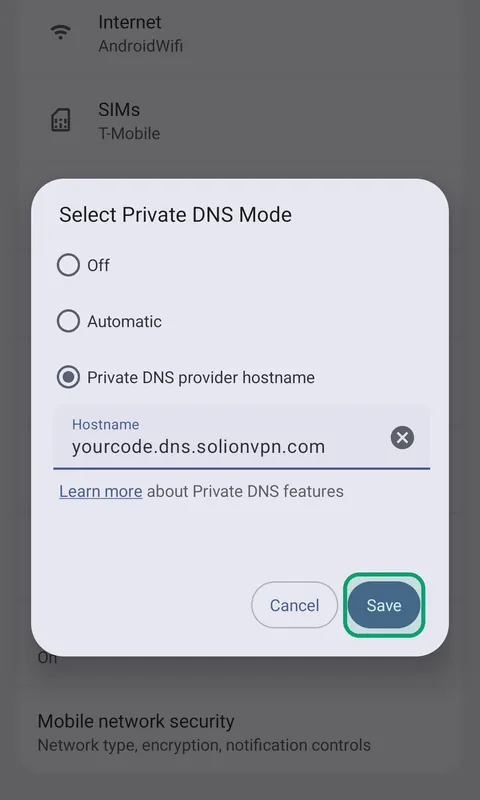
4Paste your address and tap Save
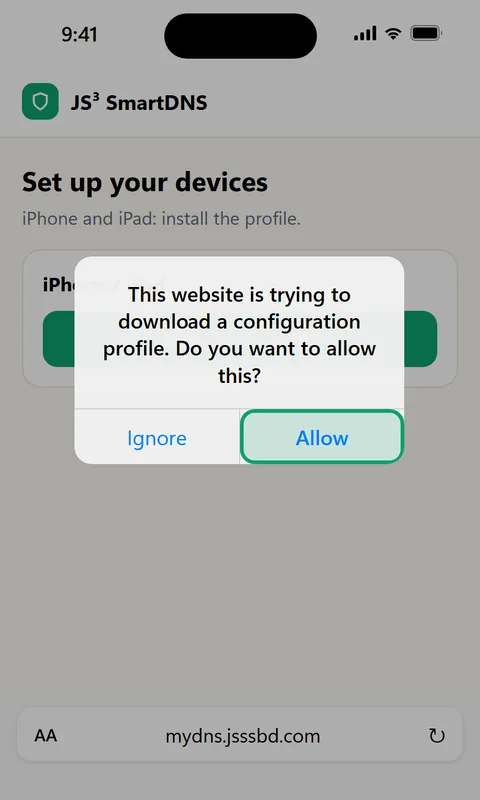
1In Safari, open your account and download the profile
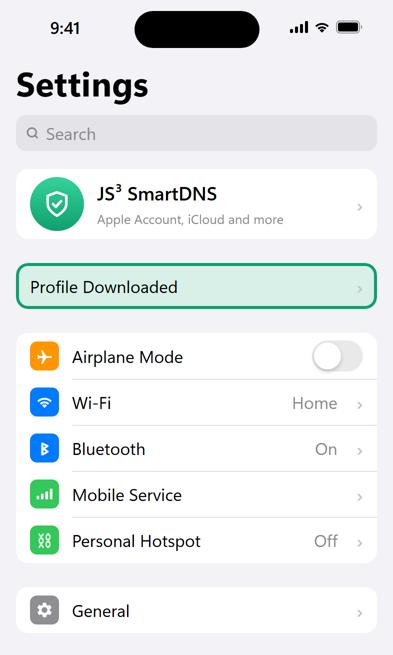
2Open Settings and tap Profile Downloaded
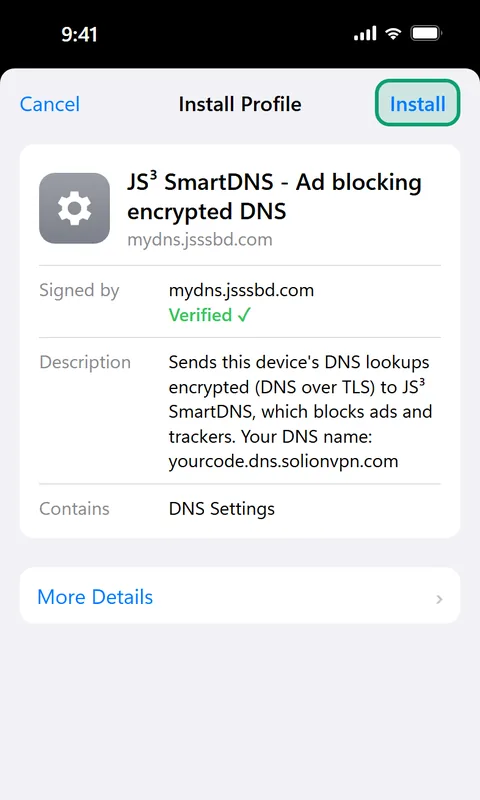
3Tap Install and enter your passcode
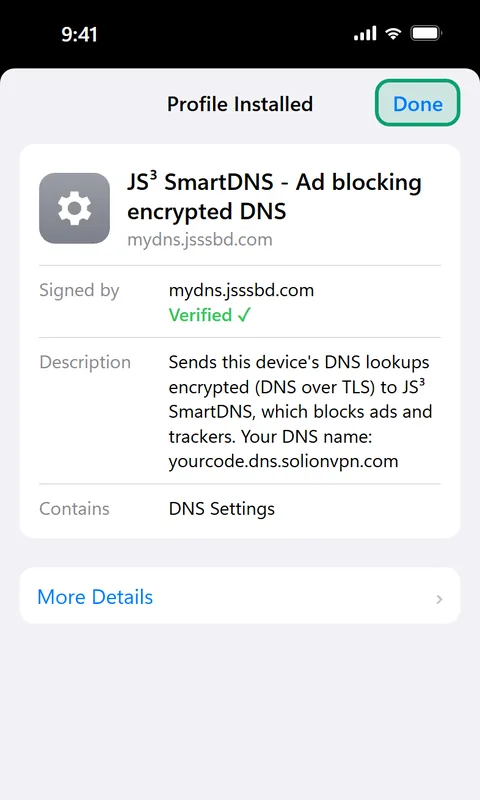
4Done. Open your apps
Phones, tablets, computers, and your whole home through the router.
Settings → Private DNS. No app.
Install a small profile from your account.
Network settings → DNS over HTTPS.
The same profile as iPhone.
Secure DNS in the browser settings, also on Windows 10.
Set it once: every device on your Wi-Fi, TV included.
Windows 10 has no setting for this: use Chrome or Edge there. Each device uses one of your package's device places.
Pay once and use it every day until it ends. Renew whenever you like.
Per device per day ৳5
Per device per day ৳5
Per device per day ৳5
Per device per day ৳5
Per device per day ৳4.93
We switch it on after checking your payment's TrxID, usually within minutes.
Both can open Bangladeshi apps abroad. Here is the difference.
Send the amount, enter the TrxID, and we switch it on.
bKashNagad Bank transfer
Built for Bangladeshis living and working abroad.
It uses Private DNS, already built into Android and iPhone. Nothing to keep switched on.
Only Bangladeshi apps go through Bangladesh. Everything else connects directly.
Your lookups are encrypted, and we never keep a list of what you visit.
Fewer ads and trackers in apps and websites.
Every customer gets a personal address that only works for them.
Message us on WhatsApp in Bangla whenever you need help.
No. Your phone already has a setting called Private DNS, and that's all we use. It works on Android 9 or newer and on iPhone with iOS 14 or newer.
No. Only the Bangladeshi apps go through Bangladesh. YouTube, Facebook and everything else connect directly, as before.
After you enter your payment's TrxID we check it, usually within a few minutes, and switch it on. You can set up your phone while you wait.
Send the package price with one of the methods shown on this page, then enter the TrxID in your account. We switch it on after checking.
Yes. Each package says how many devices it covers. Need more? Choose the Custom package and pick the days and the number of devices yourself.
A VPN sends all your internet through another country, so it often gets slower and the app has to stay on. We send only the Bangladeshi apps through Dhaka; everything else stays direct. Nothing to keep running, no extra battery.
Our refund policy (linked at the bottom of this page) explains when. If something isn't working, message us first: most problems are fixed the same day.
Message us on WhatsApp. We look into it the same day.
Create your account and pay with the app you already send money with.